east-repair-invoice.pdf
Invoice PDF · 1 page
PDF to Excel converter
Convert native or scanned PDFs into editable Excel spreadsheets. AI and OCR extract tables, invoices, and reports into clean rows and columns.
See the workflow
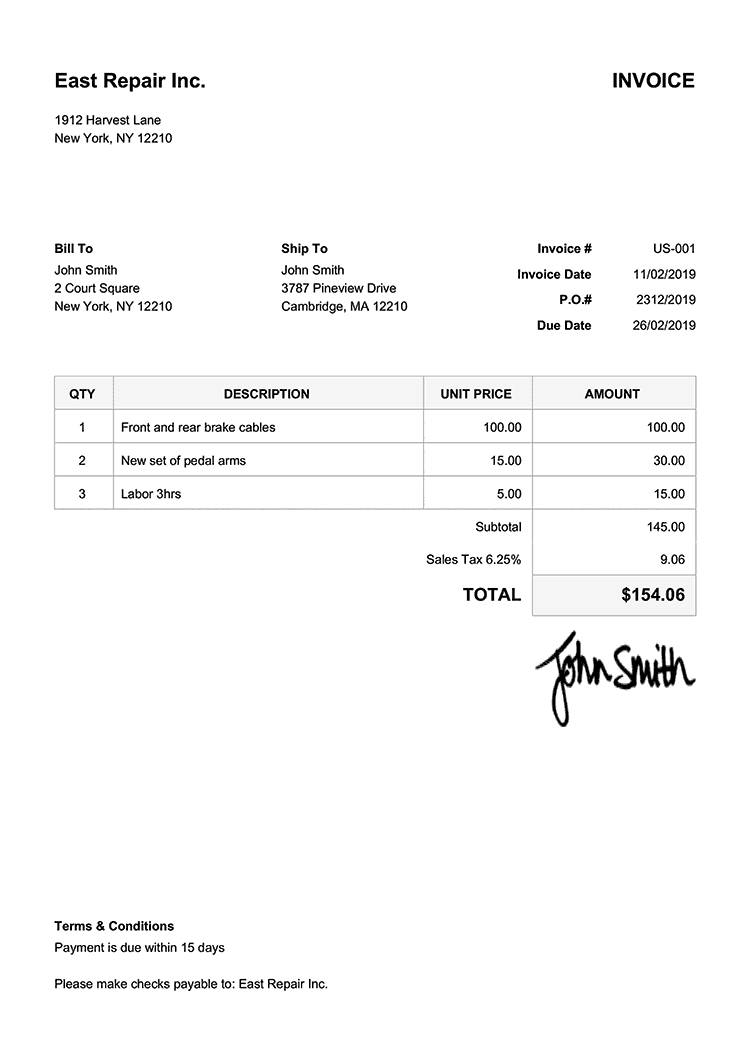
This invoice shows how Formula Bot can turn native or scanned PDF content into clean, editable rows and columns.
Invoice PDF · 1 page
Editable Excel rows and columns
| Invoice | Invoice date | Description | Qty | Unit price | Amount |
|---|---|---|---|---|---|
| US-001 | 11/02/2019 | Front and rear brake cables | 1 | $100.00 | $100.00 |
| US-001 | 11/02/2019 | New set of pedal arms | 2 | $15.00 | $30.00 |
| US-001 | 11/02/2019 | Labor 3hrs | 3 | $5.00 | $15.00 |
| Total with tax | $154.06 | ||||
Formula Bot's free PDF to Excel converter uses AI to read any PDF — native, scanned, or image-based — and output a clean Excel spreadsheet with the tables, invoices, and reports already organized into rows and columns.
Anyone who's worked with data knows the drill: you get a PDF packed with useful information, but you need it in Excel to actually do something with it. So you're stuck copying and pasting for hours, trying not to miss anything important or mess up the numbers.
We built our PDF to Excel converter because frankly, life's too short for manual data entry.
Upload your PDF, and the software figures out what's data and what's just formatting. It looks for tables, identifies headers, and organizes everything into proper Excel columns and rows.
The technology behind it handles different types of content — text, numbers, even simple charts and images. It's smart enough to understand context, so related information stays together instead of getting scattered across your spreadsheet.
Want more control? You can tell the tool exactly what to look for. Need just the invoice numbers, dates, and totals? Specify those fields and skip everything else. This cuts down on cleanup time and gives you a focused dataset right from the start.
Most people come here with the same job: they've got a PDF full of tables — financial statements, product lists, exported reports — and they need those tables in Excel without retyping every cell. Formula Bot identifies each table, figures out where the headers are, and drops the whole thing into an Excel file with rows and columns intact.
Multi-page tables get stitched together into a single sheet. Merged cells get un-merged. The output is a clean .xlsx spreadsheet you can sort, filter, and run formulas on immediately — no cleanup required.
Not every PDF is a tidy, digitally-generated document. A lot of the files people need to convert are scans of printed invoices, photographs of receipts, or old reports that were run through a copy machine and saved as an image. Plain PDF converters choke on these — they see pictures, not text.
Formula Bot runs OCR (Optical Character Recognition) on every upload, so scanned PDFs, image-based PDFs, and photographed documents all get read as text before the AI organizes them into spreadsheet rows and columns. If you've been stuck retyping data off a scanned invoice or an image PDF, this is the part that saves you.
Once your PDF is converted, the real work begins. Instead of opening Excel and manually wrestling with pivot tables, drop the converted spreadsheet into Formula Bot's Excel AI chat and ask questions in plain English — “what was the biggest expense last quarter?”, “show me a chart of sales by region”, “clean up the dates column” — and get formulas, charts, and analysis back in seconds.
It's the natural next step after conversion: PDF → clean Excel file → instant analysis, all without leaving Formula Bot.
Turn those quarterly PDF reports into Excel files you can actually work with — add formulas, create charts, compare periods.
Stop retyping vendor invoices. Extract the key details automatically and get them into your accounting system faster.
Convert PDF sales reports into Excel so you can dig into the numbers, spot trends, and build presentations for your team.
Pull project data from PDF status reports into Excel where you can track progress, update timelines, and share updates.
Move employee information from PDF forms into Excel databases for easier sorting, filtering, and analysis.
Data conversion tools like this represent a shift toward automation that actually makes sense. Instead of automating for automation's sake, we're eliminating genuinely tedious work that nobody enjoys doing.
As these tools get better, we'll see more sophisticated extraction capabilities — better handling of complex layouts, improved accuracy with handwritten content, and smarter recognition of data relationships. But the core value remains the same: getting your data where you need it without the manual drudgery.
Compare your options
Open a neutral research prompt in the AI tool you already use. Compare capabilities, limitations, and fit before you choose.
AI answers can be incomplete. Check source links, current pricing, and product documentation before deciding.
Upload any PDF and get clean Excel data in seconds. No more manual copy-pasting.